top of page

Pizi's Adventure Blog


Prepare yourself for an adventure of a lifetime!
Here you can find the latest news about my game!
#excited #Unity #gamedesign #DMA #UniversityofSurrey
Development Diary 16:Feedback
23th March, 2019
Hey Guys! I am super excited to hear some feedback/advice from you guys! Can't wait for you to play my game!
#excited #cantwait
Development Diary 15: Gameplay
#success
23th March, 2019
Hey Guys! Here is a quick sneak peak of my 1st build of the game.
#excited
23th March, 2019
How's it going guys! Huge update on my game - I managed to add more lights; add another terrain because I realized that the horizon in my game ends and you can literally see the edge of the terrain. I also added my UI for the end of the game - what I did was add a new camera and turn off the FreeCamerRig and a couple of few other things using a public GameObject and a SetActive command in my Win(); function. My jumping animation is still a little bit wierd and sometimes doesn't work properly but I'll try to fix it in the next couple of days!
21th March, 2019
Development Diary 13: Finding a font + trying to fix my jump animation #newglitches
Hi guys! Today I was trying to fix my jump animation by using different animations. I managed to find a nice cartoon looking font for my game but I still haven't fixed the ending screen of my game.
I tried building my game today but it didn't work very well - it's probably because of my grass and trees.
Development Diary 12: Adding a Opening Title Scene, and scripting basic instructions for my game + Winning statement scripting
19th March, 2019
Hi guys, today I made a lot of progress in my game. I'm gonna start off by explaining about my Opening Game Scene. I made it by duplicating the original scene and rearranging my characters the way I wanted to. Then I made a three UI buttons and wrote a simple SceneChanger C# script. Then I made my text instructions which are not the final ones. (Just making sure my codes work) as well as my winning statement + a simple animation (again not the final one) with a scene changer button.
I still haven't fixed my lighting but I'll try to do that in the next couple of days!
#staytuned
Development Diary 11: Adding C# code to fix errors + Health and Energy Bar for my Characters #HugeUpdate #PlayThrough
18th March, 2019
Hi there, today I made a lot of progress with my game:
The first thing I did is fix my deer control rig by controlling the Nav Mesh Agent, Gravity and Position Restrictions in my C# code.
The second thing I did is make the magic casting spell and switching between characters active only when Pizi collects all 4 mushrooms.
Last thing on my list was upgrading the design of the UI of my game by adding a Heath and Energy bar, as well as avatars that switch depending on whether you play as the deer or girl.
Another thing I did was switch my Deer colours before it is compelled by the girl (it's pink) and after (becomes blue).
#staytunedformoreupdates
Development Diary 10: My Magic Animation keeps looping once casted
17th March, 2019
Hey Guys! I just finished adding my magic animation and FX but one problem I'm struggling with right now is stopping the effects after the animation has stopped. Another thing I did today is to make a controller that switches between both characters. It's working well with the girl but has some problems when you're playing as the deer.
Development Diary 9: My Character can't jump #sadreactsonly
15th March, 2019
New Update: Pizzi can jump but the animation is dreadful. At least I managed to make her die as soon as she touches the river. Just making the game hard for you guys.
Oh but she keeps moving after she's dead so I have to fix that too!
Development Diary 8: Animating my animals #success
13th March, 2019
I managed to fix my animal animations by adding a couple of code lines and this is what they look like now!
PS: The Stag should be chasing the little girl :D
#success #coding #codinggoals
Development Diary 7: Animating my animals #fails
12th March, 2019
Here are some issues I had when animating my animals. I used a Patrol funcion with 3D Waypoints for animating my animals.
Development Diary 6: Environment design
9th March, 2019
Just another quick update on my game:
After I fixed my characters' animation and movement system, I decided to decorate my world by adding grass, flowers, lights and particle systems that would make my environment magical. I still haven't decided whether
I should use the main Directional light or turn it of, lose some detail but get a lot more detail in my other lights.


Development Diary 5: Creating my Character
7th March, 2019
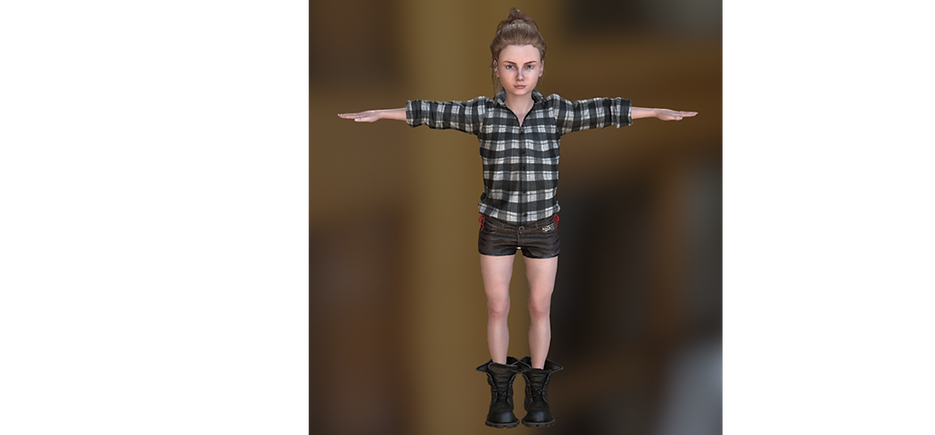
I used iClone Charecter Creator to make Pizi. One problem I had was importing her and extracting the textures in Unity. Even though I managed to extract them after trying multiple times, all textures that had an alpha transparency (the hair, eyelashes and hairline) and Unity couldn't extract it. I used Photoshop to fix that problem. I will attach the original character and the so called "broken" one. Another problem I had with her was that her mouth kept opening on its own whenever I pressed the play button. What I did to fix it is go into her avatar and configure it. Then I switched off the jaw bone so that it wouldn't be affected by any animation.



Development Diary 4: Realising that my scene isn't going to work
6th March, 2019
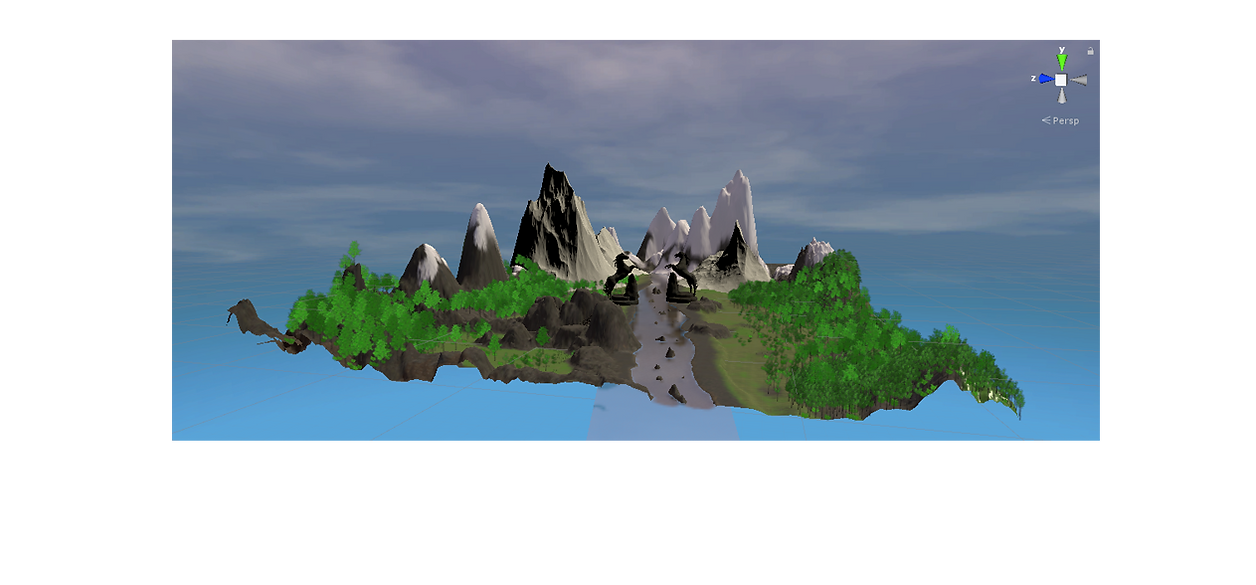
While I was exploring my scene I realised that it's not really going to work the way I wanted it to be. And going back and forth between Maya and Unity was a pain in the ass. That is why I decided to start my whole project from scratch and make my terrain in Unity so that I can change it as much as I want:
Development Diary 3: Adding a character and animating him
5th March, 2019
I found a free character on the Unity Asset store that I used trying to write my third person C# script. The issue I had was controlling the animations playing within my script and what I ended up with was a funny animated character:
Development Diary 2: Importing Assets into Unity and finding trees
3rd March, 2019
After importing my terrain in Unity I had to find a ground texture and some nature assets for my scene. I used the Stylized Forest Lite Asset and got some cool looking trees and rocks from there. I also used a water prefab from the Standard Assets. The first problem I had was that after importing my terrain I couldn't use the default terrain tools to easily paint my trees and rocks into my scene. That is why I did it by placing every tree and rock myself.

One problem with that is some of my trees "flying" rather being on the ground.

Development Diary 1: Introduction
1st March, 2019
Hi there, and welcome to the first development blog for Pizi's Adventure!
The game's story starts off when a father and his daughter are split up because of a storm while rowing a boat in the “Inari” river. Both of them then have to face the dangerous but also beautiful world and find their way back to each other. The girls’ name is Pizzi (meaning - Bravery, Gall) and she is only 12 years old. She is a tiny child that soon realises that has special “nature” powers that help defeat the dangerous forest.
I started of making the terrain in Maya. I used the sculpting tools to create it.

bottom of page